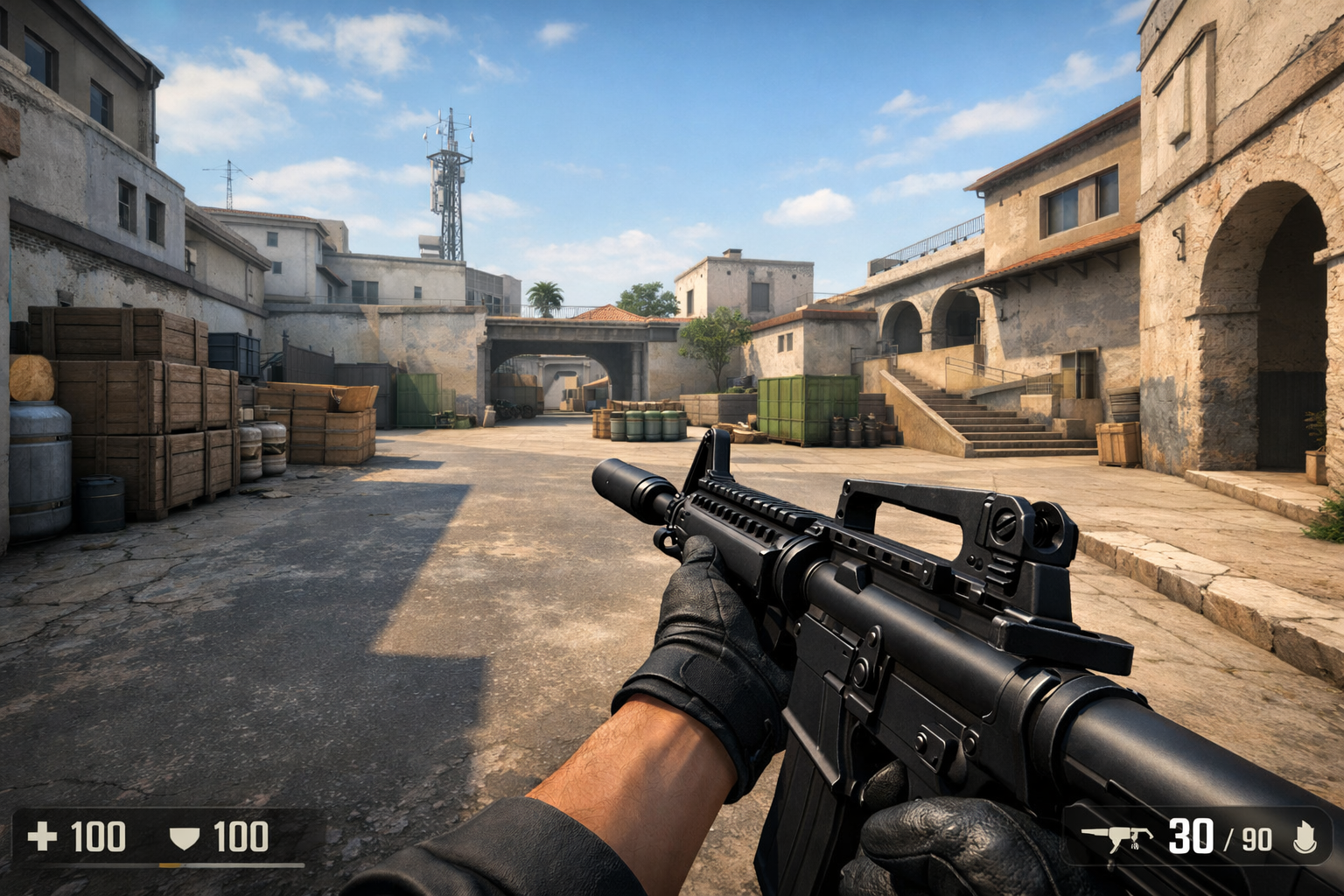
What viewmodel settings do in cs2
Viewmodel settings CS2 control how your weapon and hands appear on screen. Viewmodel settings CS2 do not change recoil or accuracy, but they can make your view feel cleaner and less distracting.
TL;DR
- Viewmodel settings in CS2 only change how your weapon and hands look on screen.
- The most important options are FOV, offsets, and movement-related animation values.
- Beginners should change one setting at a time and test for comfort and visibility.
For beginners, the easiest answer is simple: viewmodel settings change the position and movement of your weapon model on your screen. They affect how large, high, low, left, or right the gun looks while you play.
That means viewmodel settings CS2 are mostly about comfort and visibility. They can help you see more of the screen, reduce visual clutter, and make weapon animations feel less intrusive during fights.
If you want to compare how different players arrange their screen space, looking at a rain settings page can give you a practical reference point without treating one setup as mandatory.
The simplest way to understand viewmodel settings CS2
In plain language, a viewmodel is the first-person model of your weapon and hands. It is not your crosshair, your field of view, or your actual hit registration.
That distinction matters because many new players assume a smaller or lower weapon model improves spray control directly. In reality, viewmodel settings CS2 only change what you see, not how bullets behave.
The main benefit is visual management. If your rifle covers too much of the lower screen, you may feel cramped when clearing angles. If it sits too far to one side, it can also feel awkward during movement.
Most players adjust viewmodel settings CS2 to find a balance between style and function. A cleaner view can often make tracking targets and reading utility more comfortable, especially on busy bombsites.
Which viewmodel terms confuse beginners most?
The most misunderstood term is viewmodel FOV. In CS2, this changes how far away the weapon appears from your camera, not your overall gameplay FOV in the same sense players discuss monitor perspective.
A higher viewmodel FOV usually makes the weapon look smaller and farther away. A lower value makes it look larger and closer, which can feel more immersive but also more distracting.
Offset settings are the next big source of confusion. These values move the weapon left or right, up or down, and closer or farther within the screen space.
Think of offsets as placement controls. They do not change your aim point. They only reposition the model so it blocks more or less of your view.
Another term beginners mix up is bob or movement animation. These settings affect how much the weapon appears to sway or bounce while moving. Lower movement can feel calmer, while higher movement can feel more dynamic.
If you are also learning how other setup choices affect clarity, the main CS2 settings hub is a useful next stop because viewmodel choices work best when they fit your wider screen and input setup.
A quick beginner glossary
Viewmodel FOV changes apparent weapon distance. Offset X moves the weapon left or right. Offset Y moves it forward or backward in screen space. Offset Z moves it up or down.
Preset positions are simply saved starting layouts. Movement-related options control how active the weapon feels while you run, strafe, or switch weapons.
How should beginners adjust viewmodel settings safely?
The safest method is to change one variable at a time. If you move FOV, offsets, and movement values together, it becomes hard to tell which change actually helped.
Start with your main goal. If the weapon feels too large, raise the viewmodel FOV slightly. If it blocks too much of the center-left or center-right area, adjust the horizontal offset in small steps.
Then test in a simple routine. Run around a map, clear common angles, throw a few grenades, and fire short sprays. You are checking comfort and visibility, not raw accuracy changes.
Many players also benefit from copying a stable baseline first, then making small edits. For example, a hades settings example can show how a complete setup looks before you personalize it.
Keep your testing short and focused. Ten minutes is often enough to notice whether the weapon model feels calmer, less intrusive, or easier to ignore during duels.
Beginner mistakes to avoid
- Changing too many values at once and losing track of what helped
- Assuming viewmodel settings CS2 improve recoil control directly
- Picking extreme offsets that make the weapon feel unnatural
- Copying a pro setup exactly without checking your own comfort
- Judging changes after one round instead of a short repeatable test
A good beginner target is consistency. Once the weapon stops drawing your attention, your settings are probably close enough. You do not need a perfect or trendy layout to play well.
What viewmodel changes are actually useful in matches?
The most useful changes are the ones that reduce distraction without making the game feel strange. In many cases, that means a slightly higher viewmodel FOV and moderate offsets rather than extreme values.
Players who feel crowded by large rifles often prefer a setup that tucks the weapon lower or farther away. Players who like stronger visual feedback may keep the model a bit closer.
There is also a practical difference between looking clean and feeling readable. A very small weapon model can open screen space, but it can also make reload and weapon-state cues feel less obvious for some players.
That is why viewmodel settings CS2 should support your habits instead of fighting them. If you rely on visual rhythm while counter-strafing or swapping utility, a more familiar placement can be better than the smallest possible model.
Hardware comfort can matter too. On a fast esports display such as the BenQ Zowie XL2566K, motion can already look very clear, so some players may prefer calmer viewmodel movement rather than dramatic animation.
The practical next step is simple: pick one baseline, play a few sessions, and only change settings when you can name a specific problem. That approach helps beginners learn what viewmodel settings CS2 do without turning every match into a settings experiment.
FAQ
Do viewmodel settings affect recoil in CS2?
No. Viewmodel settings only change the visual position and movement of your weapon model and hands. They do not alter recoil patterns, bullet spread, accuracy, or hit registration. They can still help indirectly by making your screen feel cleaner and less distracting.
What is the best viewmodel FOV in CS2?
There is no single best value for everyone. A higher viewmodel FOV often makes the weapon look smaller and less intrusive, while a lower value makes it look closer and larger. The best choice is the one that gives you clear screen space without feeling awkward.
Should beginners copy pro viewmodel settings exactly?
Beginners can use pro settings as a starting point, but exact copying is rarely necessary. What feels comfortable depends on your screen, habits, and visual preference. It is usually better to borrow a baseline and then adjust one value at a time.